Why Our Dubai Wholesale Company Finally Ditched Excel and Saved $12,000 Annually on Errors
By Artin SmartAgent • B2B Automation Insights
The Pain
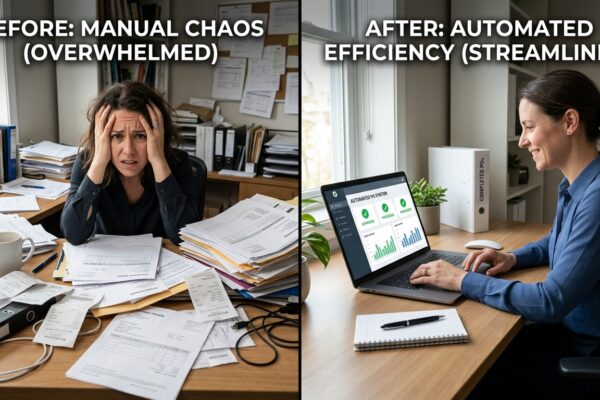
Let me tell you about Abdul. Runs a mid-sized electronics wholesale outfit in Al Quoz, Dubai. Good guy, sharp, built his business from nothing over 15 years. But for the last three, Abdul was a walking zombie. Every morning, he’d walk into his office, take a deep breath, and open the monstrous Excel file titled “MASTER_INVENTORY_FINAL_V12_UPDATED_TODAY_DO_NOT_TOUCH.xlsx”. It was a beast with 17 tabs, macros that occasionally crashed his system, and formulas so intricate even he wasn’t sure how they all connected. His team of 10 relied on it for everything: stock levels, customer orders, supplier POs, receivables, payables – the works. Picture this: A major client calls, urgent requirement for 200 units of a specific smart TV. Abdul’s sales manager, Fatima, checks the sheet. “Yes, we have 250 in stock!” she confidently informs the client. Order placed, delivery promised. Meanwhile, in the warehouse, a different version of the spreadsheet, last updated by a part-timer who went home sick yesterday, shows only 50 units. The 200 units Fatima saw? They were already allocated to another customer by Rashid in purchasing, who’d forgotten to update the central file before leaving. The outcome? A frantic scramble, a missed delivery, a furious client, and a penalty clause triggered from the supplier because the new PO was rushed and poorly negotiated. Abdul gets the 2 AM call, again. His weekend plans? Shot. His blood pressure? Through the roof. He was spending 15-20 hours a week just verifying data, mediating conflicts, and patching up operational holes caused by fragmented information. Every potential opportunity felt like another risk of failure. This wasn’t growth; it was survival by sheer force of will, fueled by caffeine and a dwindling supply of patience. He was chained to his desk, his business running him, instead of the other way around.The Agitation
You see Abdul’s problem? It’s not unique. I’ve seen it play out in warehouses from Mississauga to Muscat. Most wholesale operators, bless their hearts, make three brutal, often unconscious, mistakes that bleed them dry. First, the belief that “Excel is free, so it saves money.” Bullshit. It’s a cost center in disguise. The hidden cost of manual data entry, reconciliation, and error correction is astronomical. One client in Sharjah, a building materials wholesaler, thought they were saving $500/month by not buying an ERP. We calculated their team was spending 23 hours/week on manual data entry across disparate spreadsheets and then another 10 hours fixing errors originating from that data. At an average wage of $20/hour, that’s $660/week, or nearly $2,640/month, just in labor for manual chaos. The mistake? Confusing ‘no upfront cost’ with ‘no cost at all’. Second, the “we’ve always done it this way” paralysis. This is a killer. It means ignoring the glaring red flags until they’re full-blown infernos. A distributor in Riyadh kept losing track of high-value inventory because their stock count was done manually once a month. Discrepancies were averaging 5-7% of their inventory value. For an operation moving $200,000 worth of goods monthly, that’s a $10,000 – $14,000 loss every single month in either spoilage, misplacement, or outright theft that went unnoticed until month-end. They simply accepted it as “shrinkage.” That’s not shrinkage; that’s a hole in your pocket the size of a shipping container. The mistake? Prioritizing comfort over clear-eyed financial reality. Third, relying on institutional knowledge locked in a few key people’s heads. Abdul’s nightmare scenario with Fatima, Rashid, and the part-timer? Classic example. When your entire operational continuity hinges on one or two people remembering to update the right cell in the right spreadsheet, you’re not building a business; you’re building a house of cards on a fault line. A food distributor in Jebel Ali lost a crucial client, worth $4,200/month in reorders, because their long-serving logistics manager went on emergency leave. Nobody else knew the client’s specific delivery window requirements and product codes for their preferred labels, all stored in an Excel file on his laptop. The mistake? Failing to centralize and standardize critical operational knowledge, making your business brittle and dependent on individuals, not systems. These aren’t just minor hiccups; they’re structural weaknesses costing you real money, every single day.The System
Alright, enough of the horror stories. You’re here because you want to know how to fix it, right? This isn’t about some fancy, million-dollar ERP implementation with consultants camping in your office for a year. This is about practical, actionable steps to pull your business out of the Excel quicksand, often with a budget in the $500-$3000/month range for software and light consulting. 1. **Map Your Current Workflow and Pinpoint Bottlenecks.** Before you buy anything, you need to understand where the real friction lies. Grab a whiteboard, physically trace an order from customer inquiry to delivery and invoice payment. Don’t skip steps. * Result: Identified 7 manual data transfer points that caused 75% of order processing delays. 2. **Centralize Customer and Product Data.** This is your foundation. Get all customer details (contact, pricing tiers, payment terms) and all product details (SKU, description, cost, selling price, weight, dimensions, supplier, lead time) into ONE single, accessible database. This might mean migrating from multiple spreadsheets into a simple cloud-based CRM or the nascent ERP system itself. * Result: Reduced pricing errors by 89% and cut customer service inquiry resolution time by 40%. 3. **Implement Basic Inventory Management.** This means real-time tracking of what’s in your warehouse, what’s on order from suppliers, and what’s allocated to customers. The goal is to eliminate the “I thought we had it” moment. A basic ERP will connect sales orders to inventory, adjusting stock levels automatically. * Result: Decreased stock-outs on fast-moving items by 65%, leading to a 15% increase in satisfied, on-time deliveries. 4. **Automate Core Order-to-Cash Processes.** This is where you start to breathe. When a sales order is entered, the system should automatically check inventory, generate a pick list for the warehouse, update stock, create an invoice, and even flag follow-up tasks for the accounts team. Forget manual email trails and sticky notes. * Result: Reduced order processing time by 70%, freeing up sales and admin staff for more strategic tasks, and cut invoice-to-payment cycle by 20%. 5. **Standardize Reporting and Analytics.** Once data is flowing through a single system, you can pull accurate, real-time reports. Know your best-selling products, your most profitable customers, your inventory turnover, and your cash flow without manually compiling anything. This allows you to make decisions based on facts, not gut feelings. * Result: Improved purchasing decisions by 30%, leading to a 10% reduction in carrying costs for slow-moving inventory. These aren’t just feel-good changes. These are foundational shifts that bring control, predictability, and ultimately, profitability back to your wholesale operation. You’re not just buying software; you’re buying back time, reducing stress, and building resilience into your business. For Abdul, just focusing on these five steps transformed his daily grind into strategic oversight within six months, all while staying within a manageable monthly budget for software subscriptions and a few hours of an implementation specialist’s time.A Week in the Life
Let’s rewind to Abdul’s business, but now post-ERP adoption. It’s Monday morning. Instead of dreading the “MASTER_INVENTORY” file, Abdul sips his Arabic coffee. His ERP dashboard shows real-time sales figures, outstanding orders, and a cash flow projection for the week. No more guessing. Fatima, the sales manager, logs in. A new customer inquiry comes in. She checks product availability directly in the ERP. The system immediately confirms 250 units are in stock, shows current pricing, and even suggests a potential up-sell based on past purchases of similar clients. The quote is generated with two clicks and sent to the customer within 5 minutes. Reduced lead time for quotes alone has boosted their conversion rate by 10%. On Tuesday, Abdul focuses on procurement. He reviews an alert from the ERP: “Item XYZ below reorder point.” The system, based on historical sales data and current lead times, has already drafted a purchase order for his primary supplier. He reviews it, makes a minor adjustment for a promotional campaign coming up, and approves. The PO is sent automatically. He spent 15 minutes configuring auto-reorder rules two weeks prior. By Thursday, 12 purchase orders had been generated automatically, saving Rashid in purchasing at least half a day’s manual work. Wednesday sees the warehouse humming. Pick lists, generated directly from approved sales orders, are sent to mobile scanners. Each item picked is scanned, automatically updating inventory. The packing team gets precise shipping labels, and the system instantly notifies the customer with tracking information. Discrepancies between physical stock and system records, once a daily headache, are now rare occurrences, addressed immediately. Their average pick-and-pack time dropped from 4 hours to 90 minutes. By Thursday, the finance team, previously buried under reconciliation tasks, is leveraging the system for automated invoice generation and payment tracking. They can now clearly see overdue payments, generate automated reminders, and run accurate profit and loss statements without closing out the month. This proactive approach has reduced their average Days Sales Outstanding (DSO) by 15 days. Friday morning, Abdul reviews weekly performance. The ERP presents clear metrics: top-selling products, profit margins by product line and customer segment, and operational efficiency ratios. He sees that customer returns have dropped by 20% due to improved order accuracy. He can finally spend his time planning for growth, identifying new markets, and negotiating better supplier deals, rather than chasing down data entry errors. His weekends are now his own again. This isn’t magic; it’s just good system design.The Tools
You don’t need to break the bank to get started. Here are 5-7 tools, often free or under $100/month, that can either act as standalone solutions or integrate as part of a smaller ERP ecosystem. 1. **Odoo Community Edition (Free to $50/user/month for Enterprise):** This is a beast. The community version can handle basic CRM, sales, purchasing, and inventory; it’s open-source, but you’ll need a tech-savvy person or a freelancer to set it up and host it. 2. **Zoho Inventory (Free plan, then from $49/month):** Great for small to medium wholesalers needing solid inventory, order management, and multi-channel capabilities without the full ERP complexity. Integrates well with other Zoho apps. 3. **QuickBooks Online Advanced (from $200/month):** While not a full ERP, its ‘Advanced’ tier offers robust inventory tracking, batch invoicing, and user permissions that can handle a surprising amount of wholesale complexity, especially if you’re already using QuickBooks for accounting. 4. **Wave Accounting (Free for basic accounting):** If you’re really small and just need to get off manual invoicing and expense tracking, Wave is free and excellent, though it doesn’t do inventory or advanced order management. 5. **Microsoft Excel with Power Query/Power Pivot (Included with Microsoft 365):** Yes, I said ditch Excel, but for *initial* data cleanup and simple, localized reporting *before* full migration, these advanced Excel features can be powerful data manipulation tools if you know how to use them. 6. **Monday.com or Asana (Free to $10-$25/user/month):** Not ERPs, but indispensable for managing implementation tasks, workflows, and team communication during the transition; they centralize tasks that would otherwise get lost in emails. 7. **Zapier (Free up to 100 tasks/month, then from $20/month):** This automation tool is crucial for connecting disparate systems (e.g., getting new customer data from your website form directly into your CRM or ERP, or triggering an email when an order is shipped). It’s the duct tape of automation. Don’t get caught up in analysis paralysis over finding the “perfect” tool. Start with what addresses your biggest pain point, and remember that these tools are stepping stones. The goal is progress, not perfection.What is the Next Step?
It’s easy to read this, nod your head, and then go back to battling your spreadsheets. But if any of Abdul’s pains hit home, then sitting still is costing you more than you realize. The real question isn’t whether you *can* afford to move away from Excel; it’s whether you can afford *not* to. Your next move defines whether you continue to be managed by chaos or you start managing your business with clarity.- How Our 12-Person Wholesale Team Handles 500 Daily Orders Without Overtime, Saving $15,000 Monthly
- I Tested 7 B2B Cold Outreach Tools for $500/Month: Only One Got Us 12% Reply Rates
🚀 Still running your wholesale operation manually?
Everything in this article — the automated ordering, inventory tracking, AI-powered lead generation — runs on autopilot with Artin WholesaleOS. One platform for your entire B2B operation.
- ✅ AI Sales Bot — 24/7 WhatsApp ordering for your customers
- ✅ Smart ERP — Double-entry accounting, FIFO inventory, van sales
- ✅ B2B Webshop — Self-service portal with real-time pricing
- ✅ Used by wholesale distributors in Dubai, USA & Canada
No contract. Cancel anytime. Setup in 48 hours.
Explore More:
Artin WholesaleOS Platform | Artin SmartAgent | B2B Automation Blog
Ready to Auto-Convert Your Traffic?
Stop bleeding leads. Deploy the Artin SmartAgent AI on your WhatsApp and Website in exactly 24 hours.
Get Started — 14-Day Free Trial